Introduction to Insta Pro
Insta Pro is a name commonly associated with modified versions of Instagram that offer additional customization options and features beyond the standard Instagram application. Users interested in Insta Pro often look for more control over their social media experience, enhanced privacy settings, and convenient ways to interact with content. However, it is important to understand that Insta Pro is not an official Instagram product, and its features, availability, and safety can vary depending on the version and source.
Before downloading or using any modified application, users should learn about its potential benefits, limitations, and security risks. Understanding these factors can help people make informed decisions about their social media activities.
What Is Insta Pro?
Insta Pro generally refers to an unofficial, modified version of Instagram developed by third parties. Unlike the original Instagram app, which is maintained by Meta, modified applications may include additional settings intended to improve convenience and personalization.
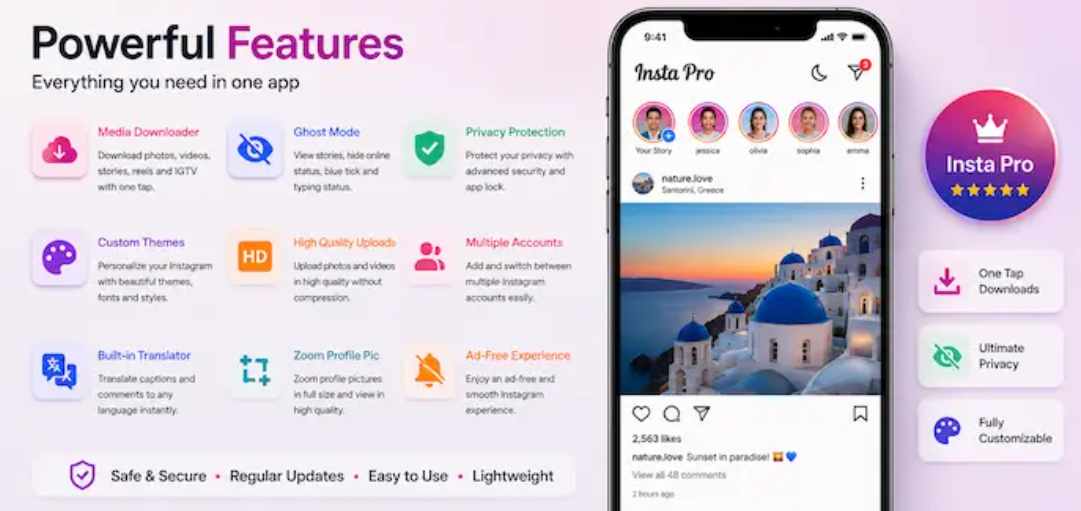
Some versions advertise features such as expanded media-saving options, interface customization, and additional privacy controls. Nevertheless, these capabilities are not guaranteed across all versions. Since Insta Pro is not officially maintained by Instagram, users should verify claims carefully and understand that unofficial software may not receive the same security updates and support as the original application.
Key Features of Insta Pro
The features associated with Insta Pro can differ between releases. Commonly advertised options include the following.
1. Media Downloading Options
Some Insta Pro versions claim to let users save photos, videos, reels, and other media directly to their devices. This can be convenient for keeping content available for personal reference. However, users should respect copyright restrictions, creators’ rights, and Instagram’s content policies when saving or sharing material.
2. Additional Privacy Settings
Certain modified versions advertise extra privacy controls, such as options for managing online visibility or read-status indicators. These features may appeal to users who prefer greater control over their social media interactions. Their reliability is not guaranteed, and they should not be treated as a substitute for Instagram’s official privacy settings.
3. Interface Customization
Personalization is another feature often associated with Insta Pro. Depending on the version, users may find different themes, colors, fonts, or layout adjustments. These options can create a more personalized appearance compared with the standard Instagram interface.
4. Enhanced User Convenience
Some releases promote shortcuts and additional controls designed to make browsing and interacting with content more convenient. Since unofficial applications can change significantly between versions, users should review the specific features rather than assume every release offers the same functionality.
Potential Benefits of Insta Pro
One reason users search for Insta pro apk is the possibility of accessing features that may not be available in the official Instagram application.
Customization options can help users personalize their experience, while certain media-saving features may make it easier to keep track of content. Additional interface controls may also appeal to people who want a different browsing experience.
However, these potential benefits should be weighed against the risks. A feature advertised by a third-party website may be outdated, unreliable, or unavailable in the actual application. Users should avoid assuming that every download source is trustworthy.
Is Insta Pro Safe to Use?
Safety is one of the most important considerations when evaluating Insta Pro. Because it is an unofficial application, its code and distribution may not be subject to the same security standards as the official Instagram app.
Downloading an application from an untrusted website can expose a device to malware, intrusive advertisements, or unwanted permissions. Entering Instagram login credentials into an unofficial application can also create account-security and privacy risks.
For these reasons, users should be cautious about installing modified applications. The safer option is to download Instagram through an official app store and use its built-in features. If an application requests unnecessary permissions or asks users to disable device security protections, avoid installing it.
Insta Pro vs. Official Instagram
The main difference between Instagram pro and official Instagram is the source and level of support.
Official Instagram is developed and maintained by Meta, with established account-management tools, privacy settings, and security updates. Insta Pro, by comparison, is an unofficial modification whose features and maintenance depend on third-party developers.
Although modified versions may advertise extra customization or downloading capabilities, they can introduce compatibility issues, account restrictions, and security concerns. Instagram may also restrict accounts that violate its terms or policies.
For users who prioritize account safety, reliability, and consistent updates, the official application is generally the better choice.
How to Protect Your Instagram Account
Regardless of which social media tools you use, protecting your account should remain a priority.
- Use a strong, unique password for your Instagram account.
- Enable two-factor authentication whenever possible.
- Avoid entering login details on unfamiliar websites or applications.
- Review account activity and connected applications regularly.
- Keep your device and official applications updated.
- Download software only from trusted sources.
- Be cautious of websites promising unlimited features or guaranteed account benefits.
These practices can reduce avoidable security risks and help protect personal information.
Conclusion
Insta Pro attracts attention from users looking for extra customization, media-saving options, and additional controls for their Instagram experience. However, its features vary by version, and its unofficial status raises important questions about security, privacy, reliability, and account restrictions.
Before considering any modified application, users should carefully evaluate the potential risks and avoid sharing sensitive login information with untrusted software. For most people, official Instagram remains the more dependable choice because it provides direct support, established security measures, and regular updates. Making an informed decision can help users enjoy social media while protecting their accounts and personal data.
FAQs
1. What Is Insta Pro?
Insta Pro is an unofficial modified version of Instagram that may offer additional features, such as interface customization, media-saving options, and extra privacy controls. Its features can vary depending on the version.
2. Is Insta Pro Safe to Use?
Insta Pro may carry security and privacy risks because it is not an official Instagram application. Downloading modified apps from untrusted sources can expose users to malware or account-security issues. The official Instagram app is generally the safer choice.
3. What Features Does Insta Pro Offer?
Depending on the version, Insta Pro may advertise features such as downloading media, customizing themes, and adjusting certain privacy settings. However, these features are not guaranteed and may not work as expected.
4. Can Insta Pro Affect My Instagram Account?
Yes, using an unofficial modified application may create account-security concerns or lead to restrictions if Instagram’s terms or policies are violated. Users should review the risks before using third-party applications.
5. Is Insta Pro Available for Android and iOS?
Insta Pro is primarily associated with unofficial Android application packages (APKs). Availability for iOS is not guaranteed, and websites claiming to offer official Insta Pro versions should be approached cautiously. For a more reliable experience, use Instagram through an official app store.